|
|
|


Defaulting the Controller
PRT-WX-DIN and PRT-WX-DIN-485 only
The Controller can be set back to the default factory configuration. This resets all internal data and event information, but does not reset the IP address.
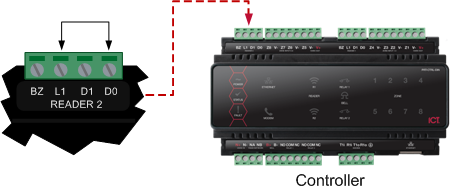
- Remove the power by disconnecting the 12V DC input
- Connect a wire link between the Reader 2 D0 input and the Reader 2 L1 output
- Power up the Controller
- Once the Controller has started and the Status light is flashing, remove the wire link from the Reader 2 connector
The system will now be defaulted with all programming and settings returned to factory configuration.
| Ask a Question |