|
|
|


Setting the Controller to use a Known IP Address
PRT-WX-DIN-1D only
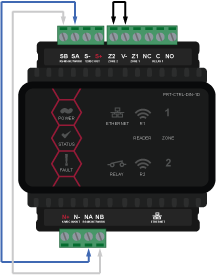
- Remove power from the Controller by disconnecting the 12V DC input.
- Connect a wire link between NA of the module network and SA of the reader network, and between NB of the module network and SB of the reader network.
- Connect Input 2 to ground.
- Power up the Controller.
- When the Controller starts up it will use the following settings:
- IP address : 192.168.111.222
- Gateway : 192.168.111.254
- Net Mask : 255.255.255.0
- DHCP : disabled
- Connect to the web interface by typing 192.168.111.222 into the address bar of your web browser, and view or change the IP address as required.
| Ask a Question |