|
|
|


Adding the Warehouse Schedules
The Warehouse requires two schedules to cover the two shifts:
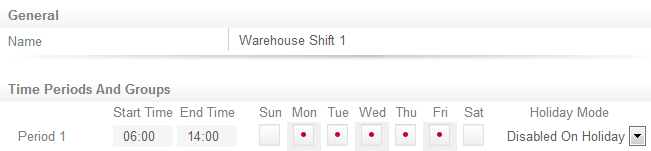
- Add a new schedule called Warehouse Shift 1
- Check Monday to Friday in Period 1 and set the holiday mode to Disabled On Holiday
- Set the schedule up to be valid from 06:00 to 14:00 Monday through Friday and disabled on holidays
- Add another schedule called Warehouse Shift 2
- Set the schedule up to be valid from 10:00 to 18:00 Monday through Friday and disabled on holidays
- Repeat the steps we took to configure our Office Hours schedule to finish both the Warehouse Shift schedules
| Ask a Question |