|
|
|


Creating the Schedule
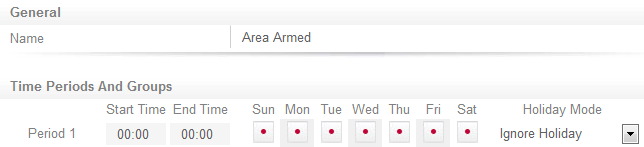
- Navigate to Scheduling | Schedules, click Add, and name the schedule Area Armed.
- Keep the default values for the Start and End times.
- Set the schedule to run over all seven days.
- Set the Holiday Mode to Ignore Holiday to ensure that the schedule operates as expected if a holiday group is inadvertently applied.
- Click Save.
| Ask a Question |