Adding a Menu Group
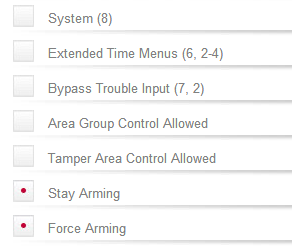
- System (8): When enabled, the menu group will allow the user to access the System menu.
- Extended Time Menus (6, 2-4): When enabled, the menu group will allow the user to access the Extended Time menus.
- Bypass Trouble Input (7, 2): When enabled, the menu group will allow the user to access the Bypass Trouble Input menu.
- Area Group Control Allowed: When enabled, will allow the user to access the area group control screen from the area status display screen.
- Tamper Area Control Allowed: When enabled, will allow the user to access the tamper area control screen.
- Stay Arming: When enabled, will allow the user to stay arm an area. The area must also have the stay arming option enabled.
- Force Arming: When enabled, will allow the user to force arm an area. The area must also have the force arming option enabled.
|

